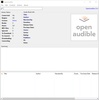

OpenAudible is a cross-platform and open-source app that allows you to download, organize, back up, and convert your Audible audiobooks easily and efficiently. With this app, you can centralize your entire library in a single place, avoiding having files scattered across different devices and folders.
An organized and accessible library
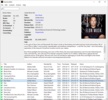
With OpenAudible, you can view all your Audible books in a single window, quickly search for titles or authors, and keep your collection up to date. The app supports all Audible regions and can manage large libraries without any lag. Additionally, if you don't remember exactly where all your titles are, you can let the tool scan and find them, without you having to do a thing. OpenAudible also lets you download any book bought on Audible and create local backups to avoid nasty surprises or losses. The download and conversion process is ultra-fast, transforming your audiobooks into MP3 or M4B formats so they can be played on any player or device.
Integrated player and shortcuts
The tool has a built-in player with quick access to the author, series, and narrator pages. It also features a large number of languages, so you can use the app in OpenAudible in English, French, German, Italian, Spanish, and more. If you have audiobooks in other languages or are learning a language, this feature will definitely help you practice, as the narrators speak with a clear and steady voice.
My thoughts on OpenAudible
Organizing my OpenAudible library has been such a relief. I downloaded several audiobooks, and the app automatically grouped them, keeping the chapters correctly divided. Not only was I able to convert these to MP3 in no time and without any formatting errors, but the built-in player is also quite convenient.
The best and the worst of OpenAudible
• What I liked most is that you can download your titles and make a backup copy, so you don't lose them.
• What I liked least is that it requires an active Audible account to take advantage of all its features.
OpenAudible is for you if...
✓ You're looking to organize, back up, and convert your Audible audiobooks efficiently.
✓ You need to centralize your Audible library and avoid having files in various places.
✓ You're interested in an integrated player and ultra-fast downloads to MP3 or M4B.
Download OpenAudible and transform your audiobook management into a fast, organized experience that is completely under your control.
Comments
Not bad for students